Forkway

Smart VPN routing for Android

Every service takes its own path.

Forkway checks which services work on your network and sends only the ones that need it through your secure path. Everything else stays direct: fast, local and unchanged.

Free · No account · No ads · Works with the VPN provider you already use

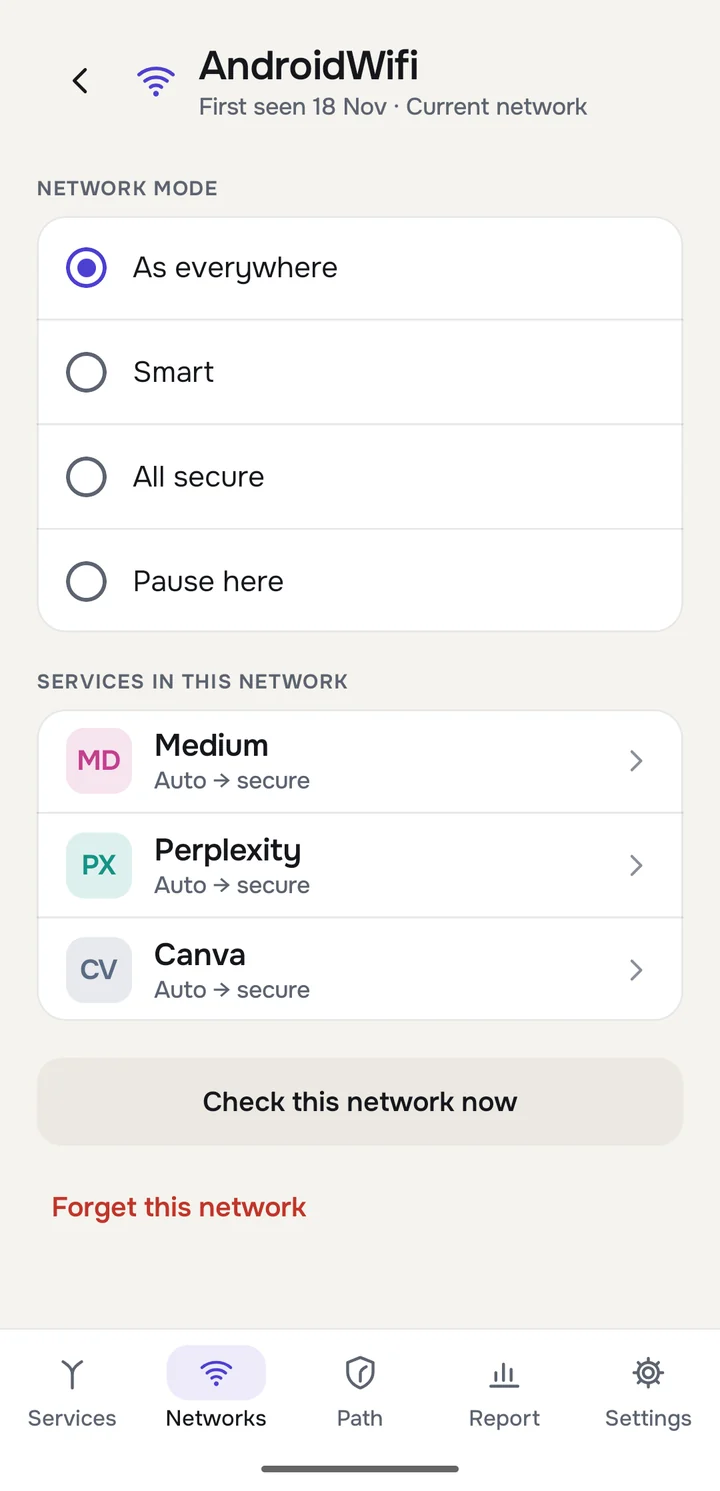
Forkway network screen
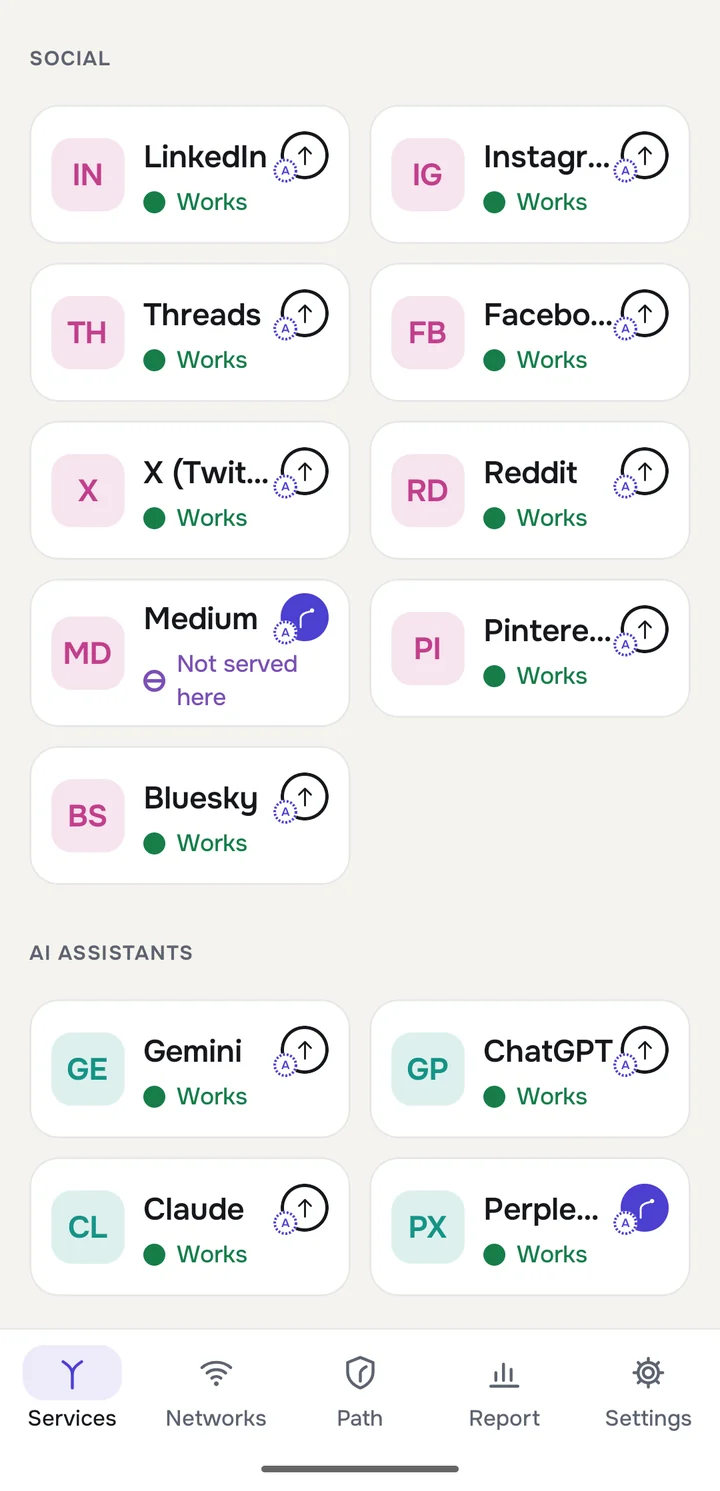
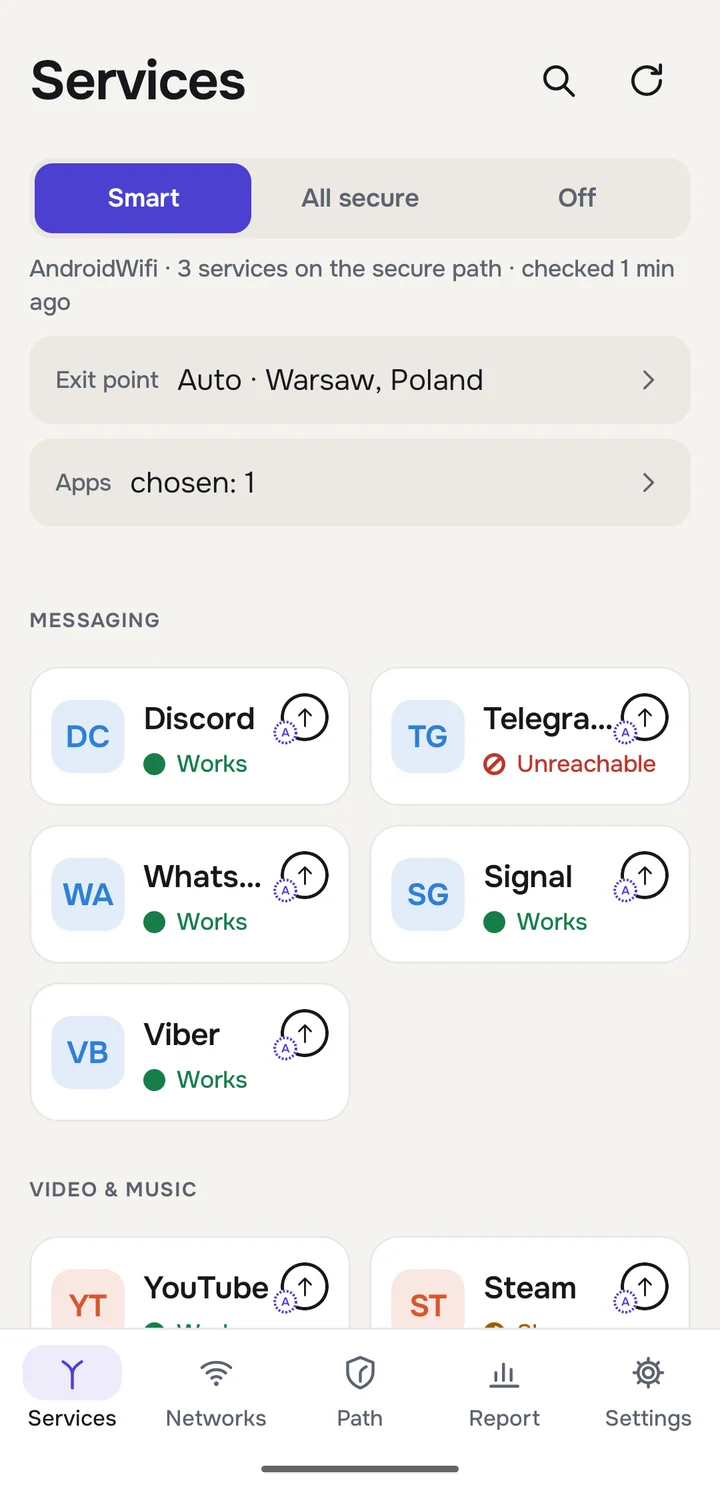
Forkway services screen in Smart mode
Per-service routingPer-network memoryPer-app routingVLESS · REALITY · WireGuard and moreNothing collected

How it works

A VPN that knows when it is needed.

Most VPN apps push everything through one tunnel. Local apps break, video slows down and maps think you are abroad. Forkway routes service by service instead.

1

It checks your network

Forkway tests about 40 popular services on the Wi-Fi or mobile network you are on, directly and through your secure path.

2

It routes only what needs it

Services that are blocked, refused or too slow go through your secure path. Everything else goes directly, fast and local.

3

It keeps watching

Results are remembered for each network and rechecked. When a service works directly again, Forkway switches it back.

Smart mode

Blocked here? Rerouted automatically.

Each tile shows how a service behaves on your current network and which way it goes. Refused or unreachable services switch to the secure path on their own, and switch back when they recover.

  • Works, slow, unreachable or not served here, at a glance
  • Smart, All secure and Off modes
  • Quick Settings tiles and shortcuts
Services rerouted through the secure path

Full control

See why. Change anything.

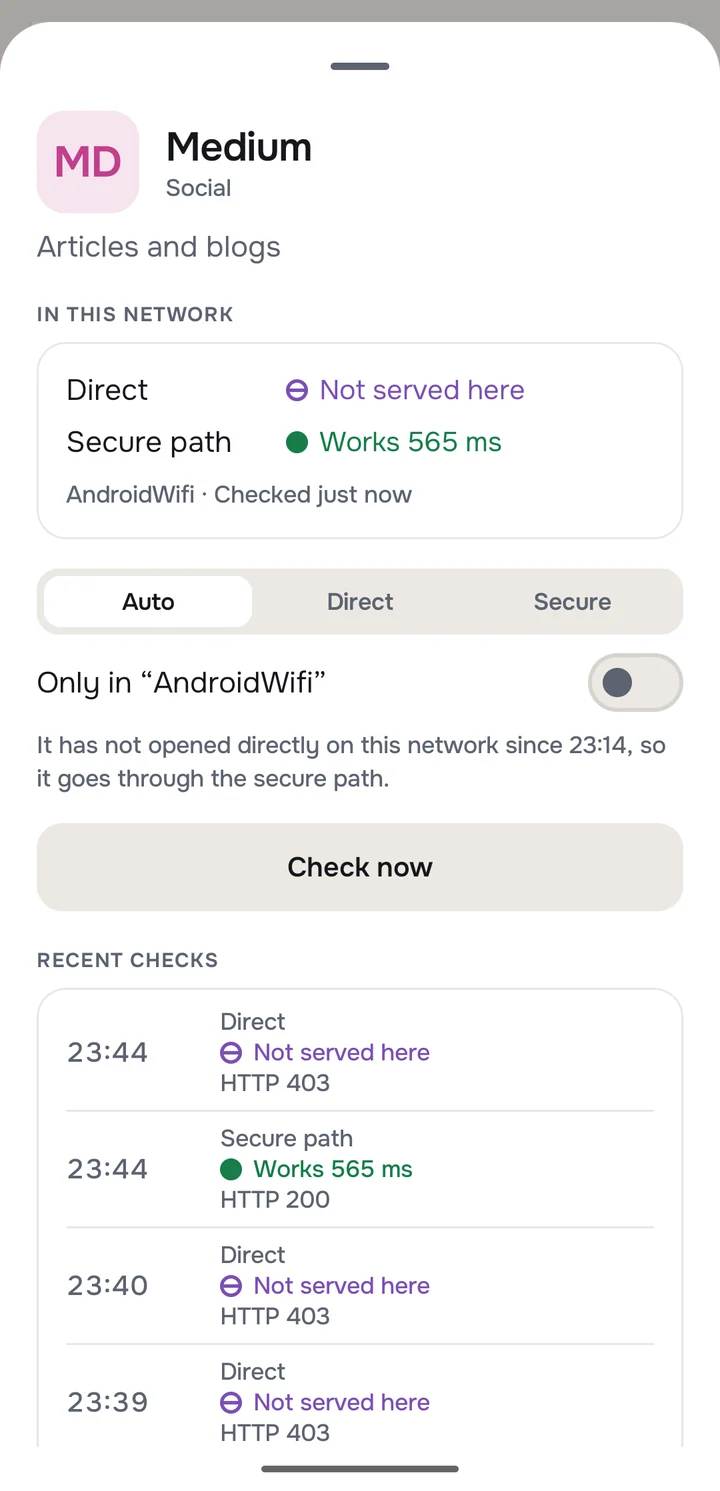
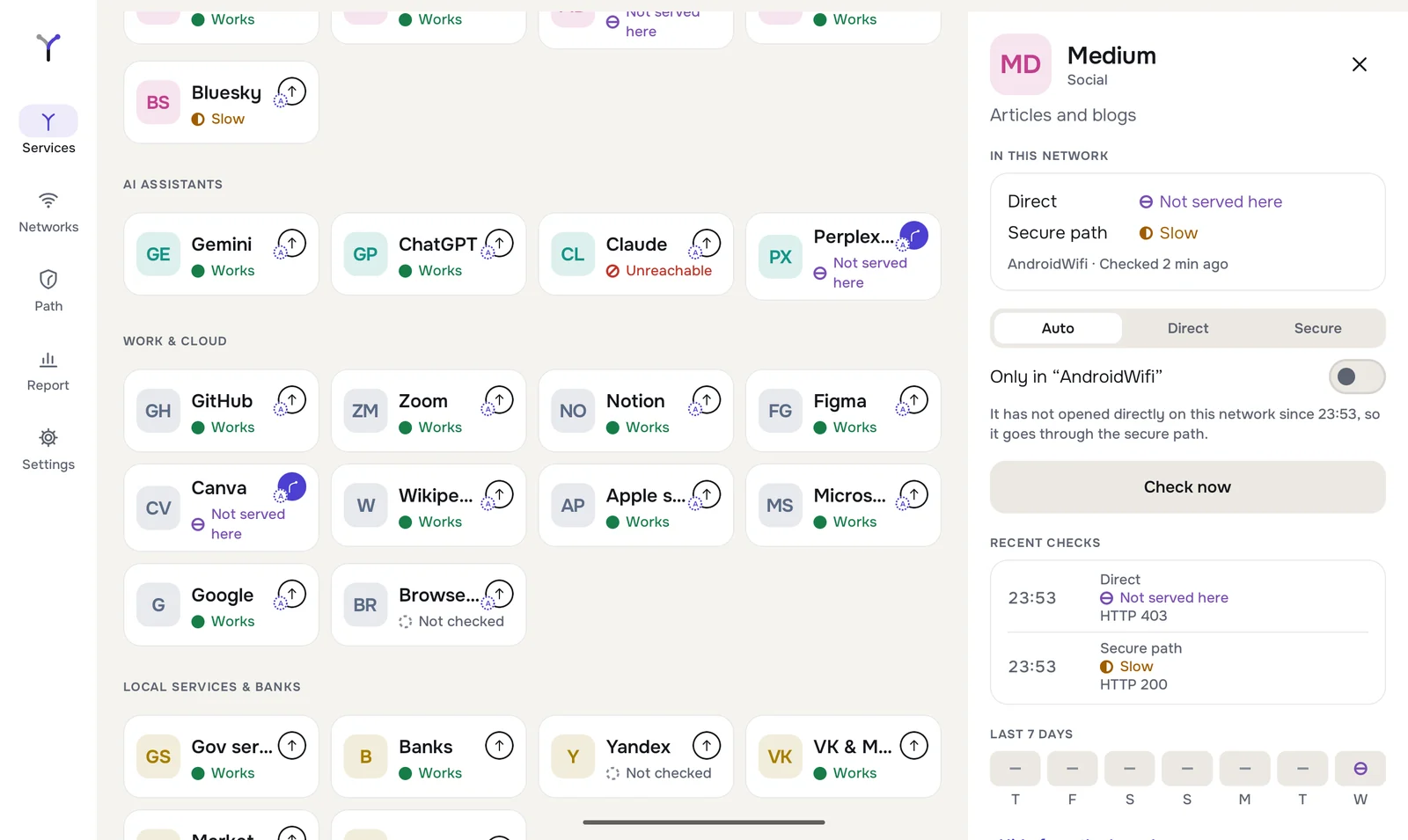
Open any service to see the direct and secure results, the reason for its route and its recent checks. Pin it to Direct or Secure, everywhere or only on one network.

  • Direct and secure results side by side
  • A plain-language reason for every route
  • Per-network overrides
Service details with route choice

Networks

Every network remembered.

Forkway keeps separate results for each Wi-Fi network and for mobile data. Set a network to Smart, All secure or Pause, and the right mode is applied the moment you connect.

  • Per-network mode and service list
  • Always-on VPN and automatic start
  • Forget a network at any time
Network details screen

Providers

Bring your own providers.

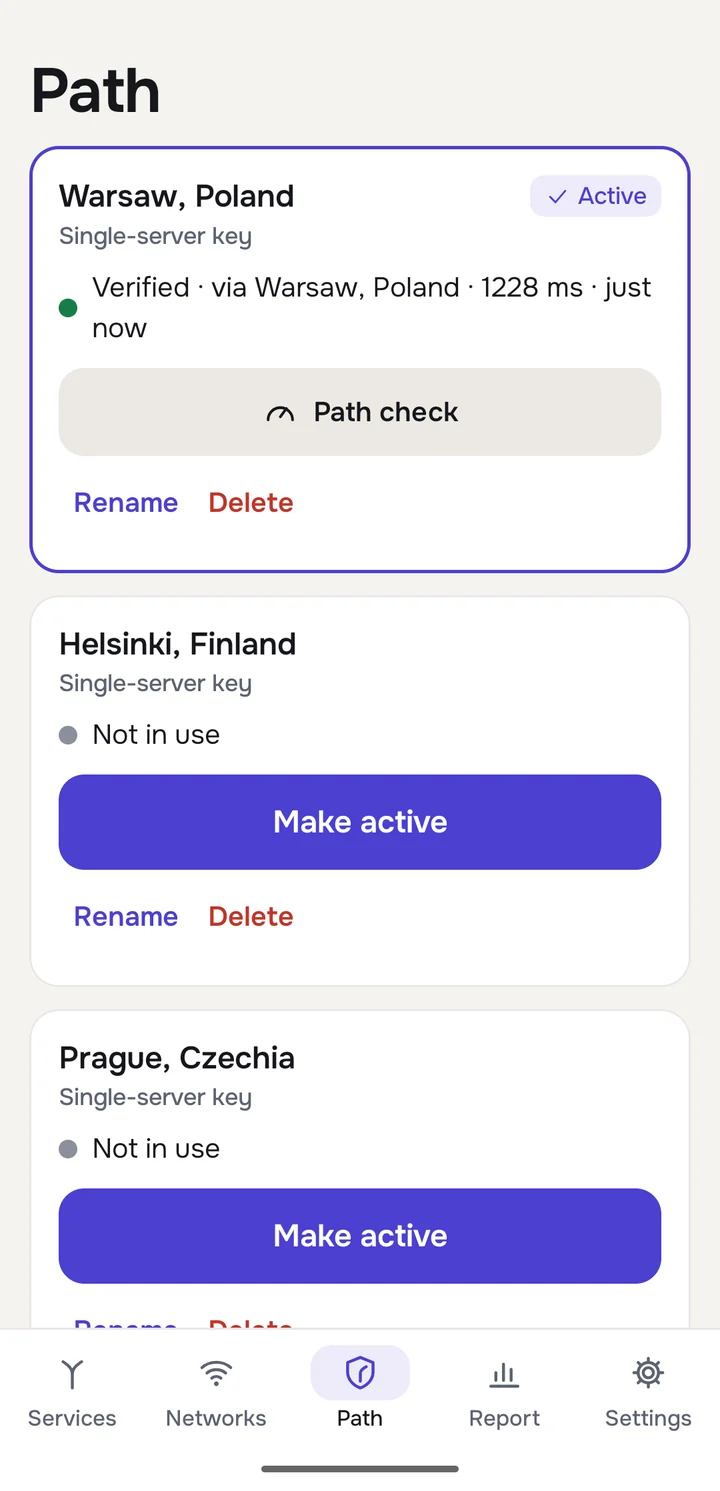
Add subscription links or single server keys by pasting, scanning a QR code or typing. Keep several side by side and make one active in a tap. Before you add a link, Forkway shows exactly what the provider will receive.

VLESSREALITYXTLS VisionXHTTPgRPCWebSocketVMessTrojanShadowsocksHysteria2WireGuardSOCKSXray JSONSIP008
Several secure paths

Apps

Route whole apps, too.

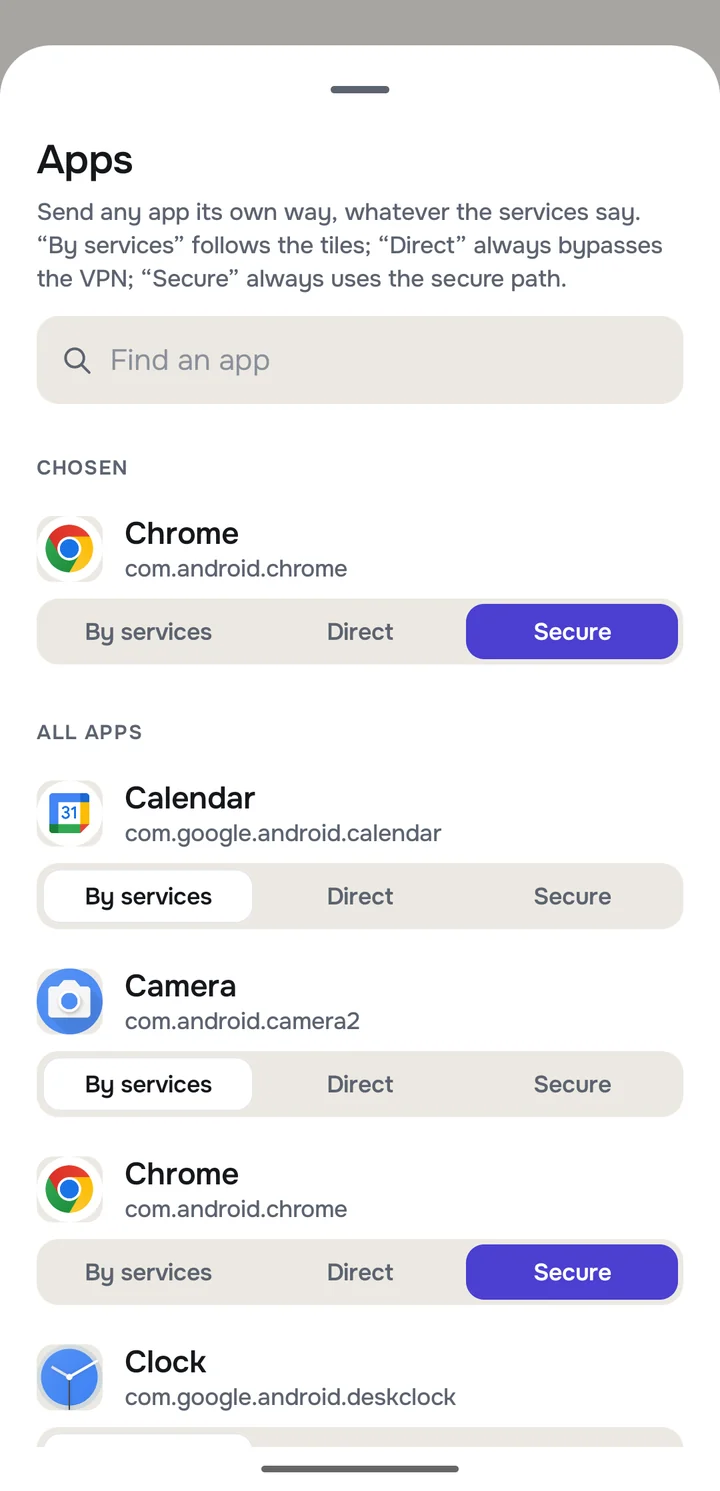
Some apps should always go one way. Send any installed app directly or through the secure path, independently of the service tiles.

  • Search across installed apps
  • By services, Direct or Secure for each app
  • Android 10 and later
Per-app routing

Everything included

Built for the way networks really behave.

Per-service routing

About 40 services in seven groups, from messaging and video to AI assistants and work tools. Each one gets its own route.

Network memory

Home, office and mobile data each keep their own results and routes, applied the moment you connect.

Per-app routing

Send any installed app directly or through the secure path, whatever the services say. Android 10 and later.

Several providers

Add subscription links and single server keys from different providers, then switch the active one in one tap.

Path check

Measure latency and download speed of your secure path, and pick a fixed exit point or let Forkway choose.

Report

See which services needed help on each network over the last 7 or 30 days.

Forkway on a tablet

For business

Secure access for teams, without breaking the rest of the phone.

Companies use VPNs so their people can reach the tools they need. Full-tunnel VPNs break local apps, slow everything down and carry far more traffic than necessary. Forkway sends only what needs protection through your infrastructure.

Work tools that just open

GitHub, Notion, Figma, Zoom, AI assistants: when a network blocks them, they go through your company's secure path automatically, without the team switching anything.

Local services stay local

Banking, government and local sites, printers and office devices keep working directly, so a VPN no longer breaks the rest of the phone.

Ready for travel

Staff moving between countries, hotels and client sites get the right routes on every network, remembered for the next visit.

Your own infrastructure

Bring the servers you already run or rent. Forkway speaks the protocols of modern Xray-based setups and standard ones like WireGuard.

Nothing collected

No accounts, no telemetry, no third-party SDKs. There is no Forkway server that could hold your team's data.

Less traffic, lower cost

Only the services that need it use the secure path, so your servers carry a fraction of the traffic a full-tunnel VPN would.

Rolling Forkway out to a team? Write to [email protected].

Private by design

We built Forkway so there is nothing to collect.

Forkway runs on your device and talks only to the provider you chose and the services it checks. There is no Forkway server in the middle.

Read the Privacy Policy

  • No account, no sign-upInstall, add your link and go.
  • No analytics or adsNo tracking, crash-reporting or advertising SDKs.
  • Encrypted on deviceLinks and keys are protected by the Android Keystore and excluded from backups.
  • Transparent by defaultThe app shows what your provider receives before you connect.

FAQ

Questions, answered.

Is Forkway a VPN service?

Forkway is a VPN client. It does not sell or run VPN servers. You connect it to the provider you already use by adding a subscription link or a server key. Forkway then decides, service by service, what goes through that provider and what goes directly.

Which protocols are supported?

VLESS (including REALITY, XTLS Vision, XHTTP, gRPC, WebSocket, HTTPUpgrade and mKCP), VMess, Trojan, Shadowsocks, Hysteria2, SOCKS and WireGuard. Subscriptions can be Base64 or plain link lists, Xray JSON or SIP008.

How does Forkway decide what needs the VPN?

It makes short test connections to about 40 popular services on the network you are using, both directly and through your secure path. Services that are unreachable, refused or too slow directly go through the secure path; everything else goes directly. Results are remembered per network and rechecked over time.

Can I override the automatic choice?

Yes. Any service can be pinned to Direct or Secure, everywhere or only on one network. You can also route whole apps, choose a fixed exit point, switch to All secure (a classic full VPN) or pause Forkway on a trusted network.

What data does Forkway collect?

None reaches us. There is no account, no analytics and no advertising. Links, keys, check results and settings stay on your device, and links and keys are encrypted with the Android Keystore. Your provider receives the subscription request and the traffic you send through it. Read the Privacy Policy for the full details.

More answers on the Support page →

Stop choosing between a VPN and a phone that works.

Forkway is free, with no ads and no account. It works with the VPN provider you already use.

Coming soon to Google Play